Posts

Bringing data into Splunk (Continued...)

What happened behind the hood? When we added the new log file to be monitored via the graphical interface, it created and added a configuration item into inputs.conf configuration file. You can find the configuration file here: $SPLUNK_HOME/etc/apps/search/local/inputs.conf You can also manually edit this file and add your custom stanza, once done to notify Splunk about the changes, the daemon needs to be restarted. It will contain something like this: [monitor:///var/log/messages] disabled = false host = splunk_server index = idx_messages sourcetype = linux_logs Above block is known as stanza, lets decipher this :)  monitor: This is used to specify which logfile(s) you want to monitor i.e. you can mention a specific logfile as well as full directory lets say you want to monitor everything under /var/log directory, just mention "monitor:///var/log/" and Splunk will try to index everything which is there in that directory. disabled: Lets say you w...

Bringing data into Splunk

Image
Now, lets dive deep into bringing data into Splunk. Splunk Enterprise can index any type of data, however it works best with data with timestamps. When Splunk indexes data, it breaks it into events based on timestamps. Every event or data which is indexed into Splunk should have a sourcetype ( helps to identify the type of data which is indexed ) assigned to it. In corporate environment, majorly forwarders ( ref: here ) are used to input data into Splunk but there are other ways as well in which you can get your data indexed to Splunk. Lets assume you want to monitor a log file of the local machine on which Splunk is installed then you can use the hyperlinks which are listed under "Local inputs" otherwise you can use the hyperlinks which are listed under "Forwarded inputs". For achieving that, you can navigate to "Settings" => "Data Inputs" => "Local Inputs" => "Add New" (NOTE: Make sure Splunk have a...

#4 Splunk sub(Commands) [timechart, geostats, iplocation]

Image
TIMECHART : Helps you to create a time series chart with respect to event statistics. Example: index=_audit | timechart span =5m count by action useother=f Above query will help to create a timechart with respect to an specific field(it this case its action) from the events. If you will notice, there is something called span (length of time for which the statistics are considered). In this case each bar(or line chart) in bar graph will be of 5 mins. Another things to notice is useother, this option specifies whether to merge all of the values which are not included in the results into a single new value called OTHER, accepted values t(true) or f(false). Statistics, will help you to see a table consisting of all the statistics fetched based on your query. Visualization, will help you to see the timechart. Select Visualization, helps you to select your preferred visualization type. GEOSTATS : Helps to create a cluster map based on your events. ...

#3 Splunk sub(Commands) [eval, round, trim, stats, ceil, exact, floor, tostring]

Image
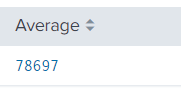
ROUND: Eval with round takes one or two numeric arguments, returning 'first value' rounded to the amount of decimal places specified in 'second value'.  By default it will remove all the decimals. Example: index=idx_messages sourcetype=linux_logs | eval new_rt= trim ( replace (response_time, "ms.", "")) | stats avg (new_rt) as Average | eval Average= round (Average) Remove all the decimal values. Example: | eval Average= round (Average,3) Rounded the value up-to 3 decimal places. Example: | eval Average= ceil (Average) Round the value up-to the next highest integer. Example: | eval Average= exact (Average) Give the output with maximum possible number of decimal values. Example: | eval Average= floor (Average) Round the value down to the nearest whole integer. Apart from this, there are other functions as well which are used by eval command, for instance pi (), sqrt () etc. TOSTRING: Hel...

#2 Splunk sub(Commands) [eval, trim, chart, showperc, stats, avg]

Image
TRIM: Basically it helps you to create more meaning full data from existing data i.e. it helps you to remove noise from the results. Example: index=idx_messages sourcetype=linux_logs | eval new_rt= trim (replace( response_time , "ms.", "")) In above example, response_time is an existing field which consists of some unwanted data like "ms." which we don't want. So, by using eval and trim we can remove that unwanted data. If you will notice, above search will create a new field called new_rt which contains our intended results i.e. without "ms." CHART: It basically results your finished data in a table format, further that data can be used to visualize via different mechanism. Example: index=idx_messages sourcetype=linux_logs | chart count by date client useother=f Honestly the example is not so good but I believe, you are able to reach to the crux of it, i.e. it will show you which client on which date made how ma...

#1 Splunk sub(Commands) [top, rare, fields, table, rename, sort]

Image
TOP: Will show you top results with respect to your field. Example: index=_internal | top limit=5 component RARE: Will help you to find out least common values of a field, i.e. it is similar to TOP but works in opposite direction. Example: index=_internal | rare limit=5 component FIELDS: Will help you to limit your columns, lets say you want to remove count from above table, fields can help you to achieve that. Though there are other usage of fields as well but you will learn slowly and gradually when you start building some complex queries. Example: index=_internal | top limit=5 component | fields component, percent TABLE: Same thing can be achieved via table as well. Example: index=_internal | top limit=5 component | table component, percent RENAME: Lets say you want to rename a column, for that you can use rename command. Example: index=_internal | top limit=5 component | rename percen...

Searching in Splunk

Image
Searching on Splunk is quite simple. Just login to your Splunk Enterprise installation, navigate to App: Search & Reporting . It will bring you to a new web page which is basically our search head. Type in your query and you are done. All your events which matched your query will be presented on your screen, If you will notice below, the query which I have used have nothing much its just searching all the events from "idx_messages" index < remember we added a monitor on one of our remote host to forward the data to idx_messages index   >. Based on above search it resulted in 1068 events in last 7 days. Field names are case sensitive. Field values are not case sensitive, if used without single quotes. i.e. below queries with give us same results: index=idx_messages date_wday=monday  index=idx_messages date_wday=MONDAY index=idx_messages date_wday="MONDAY" But if I use below query it might not give me...